# How to bridge assets to Base

## **Bridges**

* Click the **\[chain icon]** on the top right corner&#x20;
* **\[select a bridge]** to transfer your fund to Base Network

<figure><img src="https://766933878-files.gitbook.io/~/files/v0/b/gitbook-x-prod.appspot.com/o/spaces%2FifJoX8SL0anL5Gj0WFNP%2Fuploads%2FItQd0TUayV7lBigXBloC%2FJOJO%20bridge.png?alt=media&#x26;token=5b246e4b-23c0-4ce2-9de0-5ac4a2228ce3" alt="" width="563"><figcaption></figcaption></figure>

## **Bridge to Base by Galaxy**

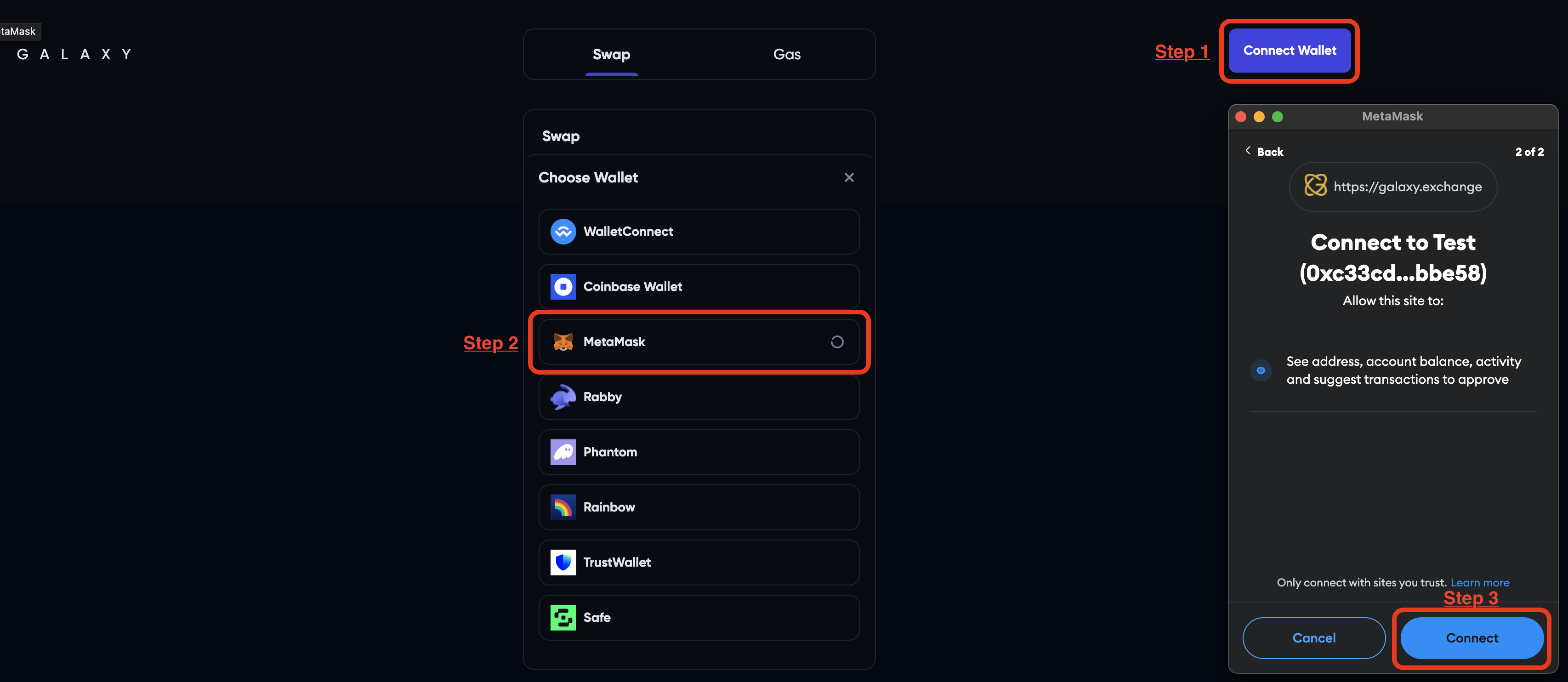
1. **\[Connect wallet]** to Galaxy

<figure><img src="https://766933878-files.gitbook.io/~/files/v0/b/gitbook-x-prod.appspot.com/o/spaces%2FifJoX8SL0anL5Gj0WFNP%2Fuploads%2FJaz0Po5dupdqdj7YmhWq%2FScreenshot%202024-05-08%20at%206.21.49%E2%80%AFPM.png?alt=media&#x26;token=deda1653-da11-4012-8868-a25bf75f3556" alt=""><figcaption></figcaption></figure>

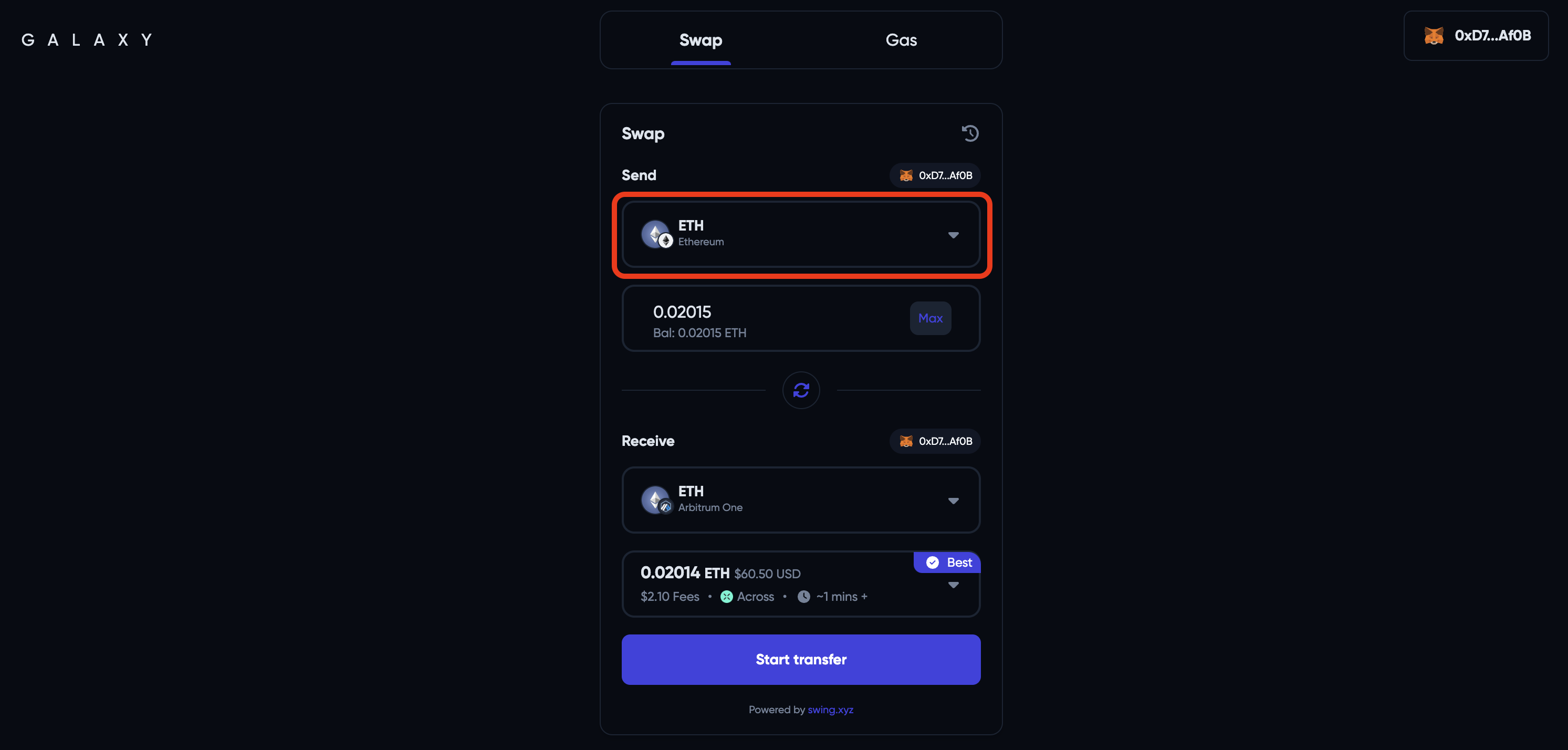
2. Select the **\[source chain] and \[asset]** to bridge

<figure><img src="https://766933878-files.gitbook.io/~/files/v0/b/gitbook-x-prod.appspot.com/o/spaces%2FifJoX8SL0anL5Gj0WFNP%2Fuploads%2FZUgXE5Fj9LzJAVh65CzP%2FScreenshot%202024-05-08%20at%206.57.06%E2%80%AFPM.png?alt=media&#x26;token=af3bb1ef-332d-4892-ad3e-573be7344092" alt=""><figcaption></figcaption></figure>

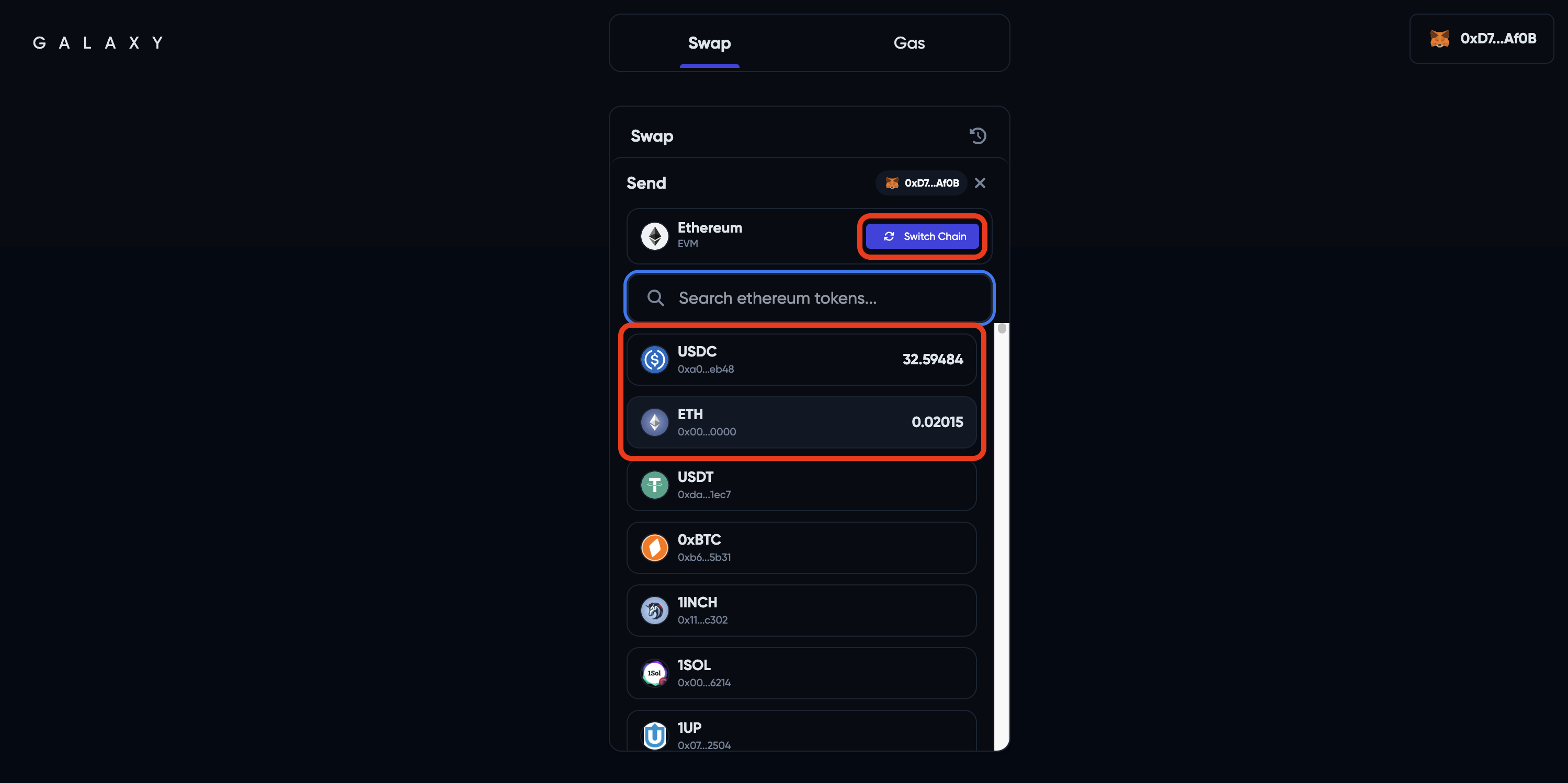
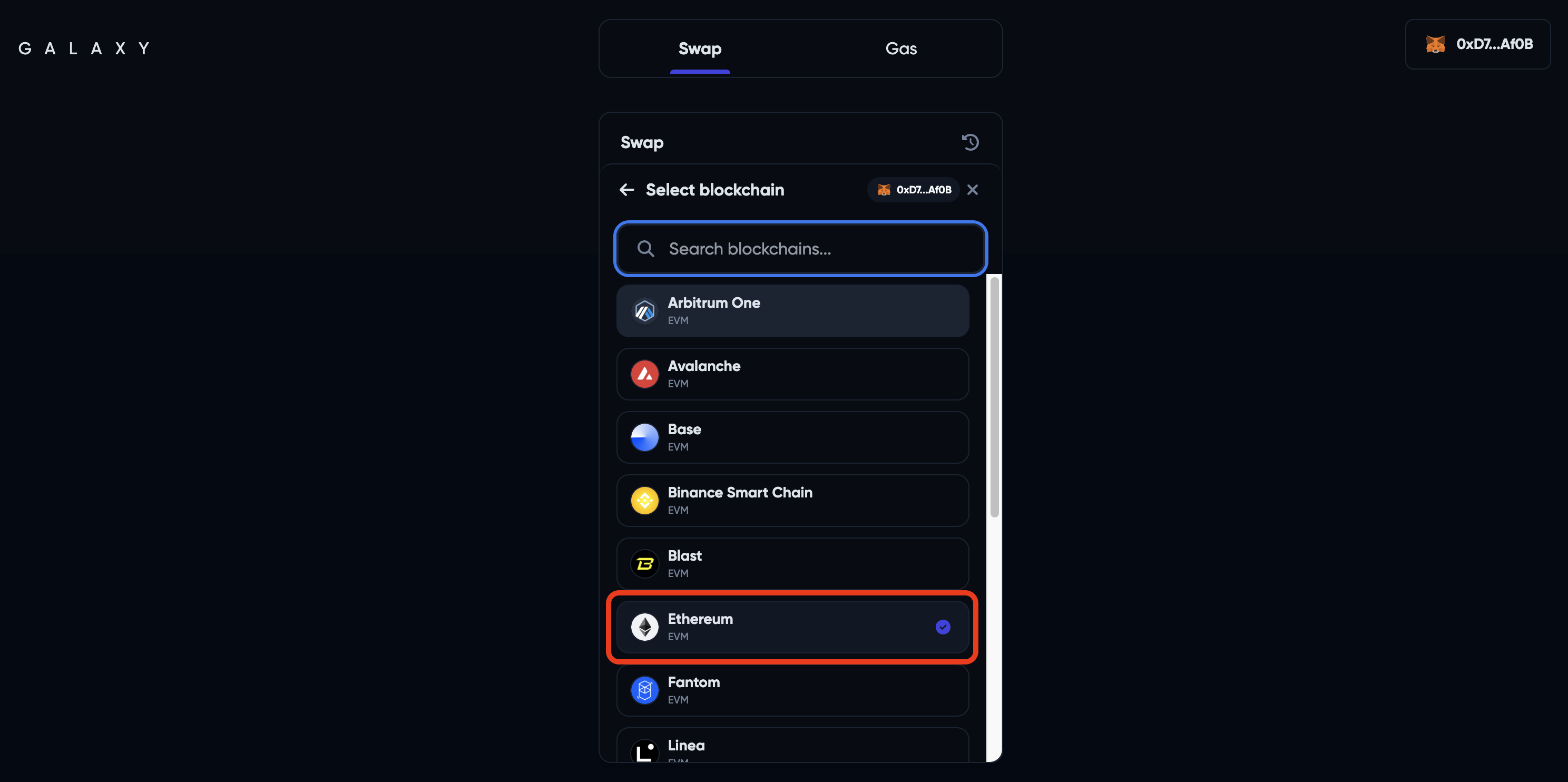
3. Choose an **\[Asset]** to bridge, then click on **\[Switch Chain]** to select a network as source chain

<figure><img src="https://766933878-files.gitbook.io/~/files/v0/b/gitbook-x-prod.appspot.com/o/spaces%2FifJoX8SL0anL5Gj0WFNP%2Fuploads%2FfvbPbLbrvgN0o34Pk6rx%2FScreenshot%202024-05-08%20at%206.58.45%E2%80%AFPM.png?alt=media&#x26;token=bec90141-0949-49a7-8ff4-8af2d2f63acd" alt=""><figcaption></figcaption></figure>

<figure><img src="https://766933878-files.gitbook.io/~/files/v0/b/gitbook-x-prod.appspot.com/o/spaces%2FifJoX8SL0anL5Gj0WFNP%2Fuploads%2Fn2yjyUcxPixSsQsOZABs%2FScreenshot%202024-05-08%20at%206.59.55%E2%80%AFPM.png?alt=media&#x26;token=6f11a3ad-c62a-473b-bd41-3704023d2abd" alt=""><figcaption></figcaption></figure>

5. Input your desired **\[Amount]** to bridge&#x20;

<figure><img src="https://766933878-files.gitbook.io/~/files/v0/b/gitbook-x-prod.appspot.com/o/spaces%2FifJoX8SL0anL5Gj0WFNP%2Fuploads%2FmlVK4ydp6MKp3mtbjNXE%2FScreenshot%202024-05-08%20at%207.02.24%E2%80%AFPM.png?alt=media&#x26;token=869e5249-301f-40b9-8378-3a9b30e261aa" alt=""><figcaption></figcaption></figure>

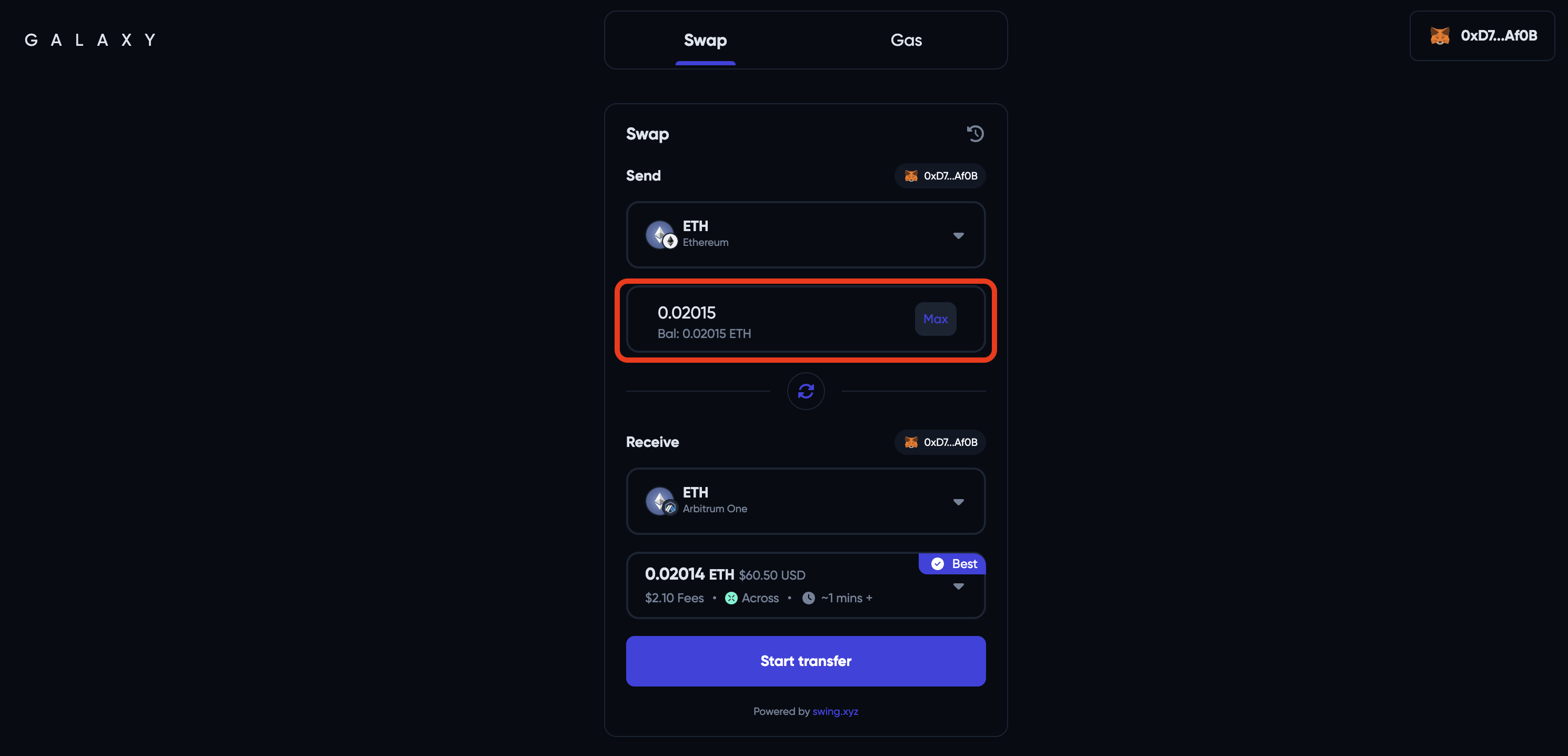
6. Select Base Network as your destination and choose the token you want to receive there

<figure><img src="https://766933878-files.gitbook.io/~/files/v0/b/gitbook-x-prod.appspot.com/o/spaces%2FifJoX8SL0anL5Gj0WFNP%2Fuploads%2F1sTTE5RxZG8di8GwG3qu%2FScreenshot%202024-05-09%20at%206.43.34%E2%80%AFPM.png?alt=media&#x26;token=e17f27a7-4419-4f25-a344-718a27d6fac1" alt=""><figcaption></figcaption></figure>

6. Galaxy will automatically suggest you the best route. Click **\[Start Transfer]** to initiate the transfer.

<figure><img src="https://766933878-files.gitbook.io/~/files/v0/b/gitbook-x-prod.appspot.com/o/spaces%2FifJoX8SL0anL5Gj0WFNP%2Fuploads%2FXHWSrpyGcoF9sQ1UuHj9%2FScreenshot%202024-05-08%20at%207.05.46%E2%80%AFPM.png?alt=media&#x26;token=5eb0fef0-a824-4aca-b2cb-fe2fa3cbbc2b" alt=""><figcaption></figcaption></figure>

7. Confirm the transaction in your wallet and your funds will soon be on Base Network!

## Bridge to Base by Jumper

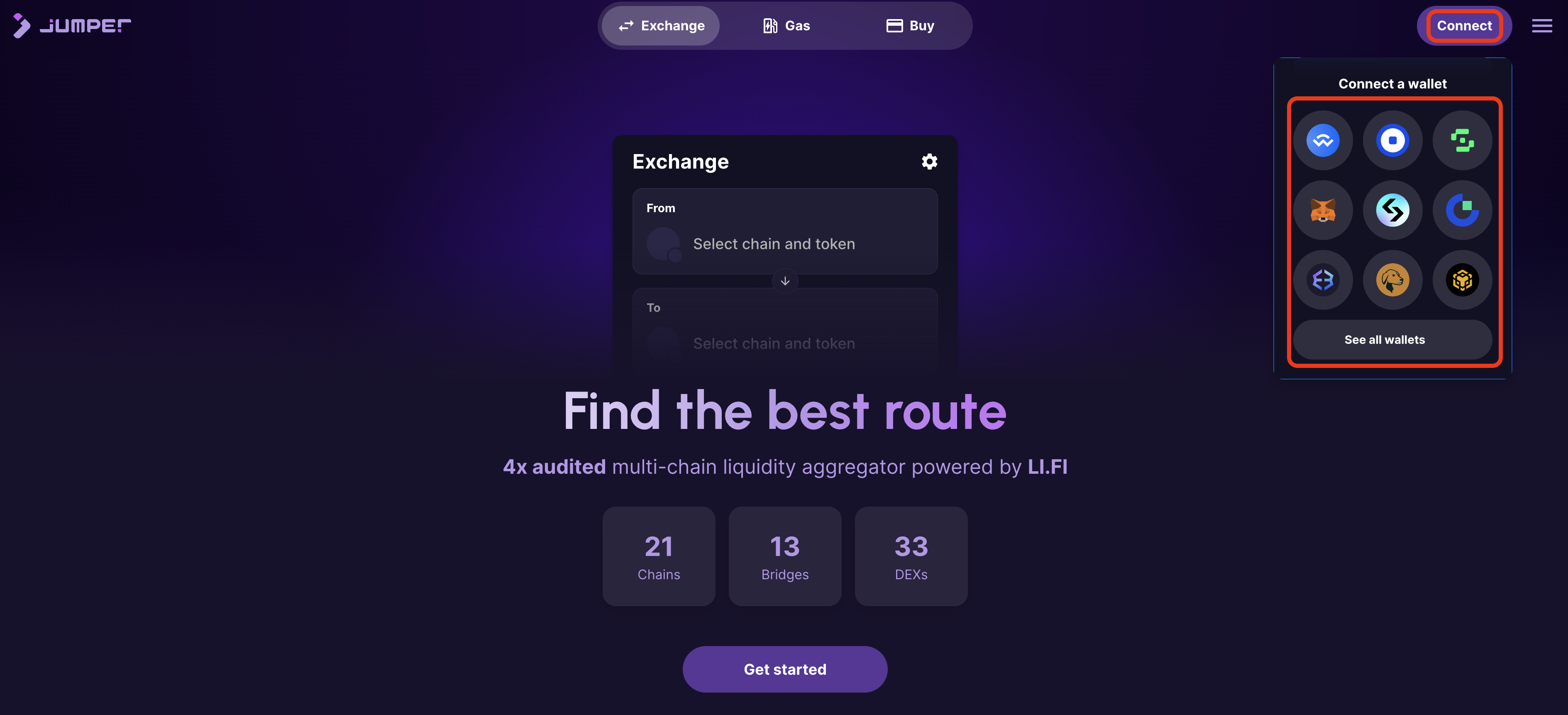
1. **\[Connect wallet]** to Jumper

<figure><img src="https://766933878-files.gitbook.io/~/files/v0/b/gitbook-x-prod.appspot.com/o/spaces%2FifJoX8SL0anL5Gj0WFNP%2Fuploads%2FPdRSC9ONqxxma0E3vE6F%2FScreenshot%202024-05-09%20at%205.46.45%E2%80%AFPM.png?alt=media&#x26;token=3ced0d78-1a6b-4b29-bd6a-6fb59274f7b5" alt=""><figcaption></figcaption></figure>

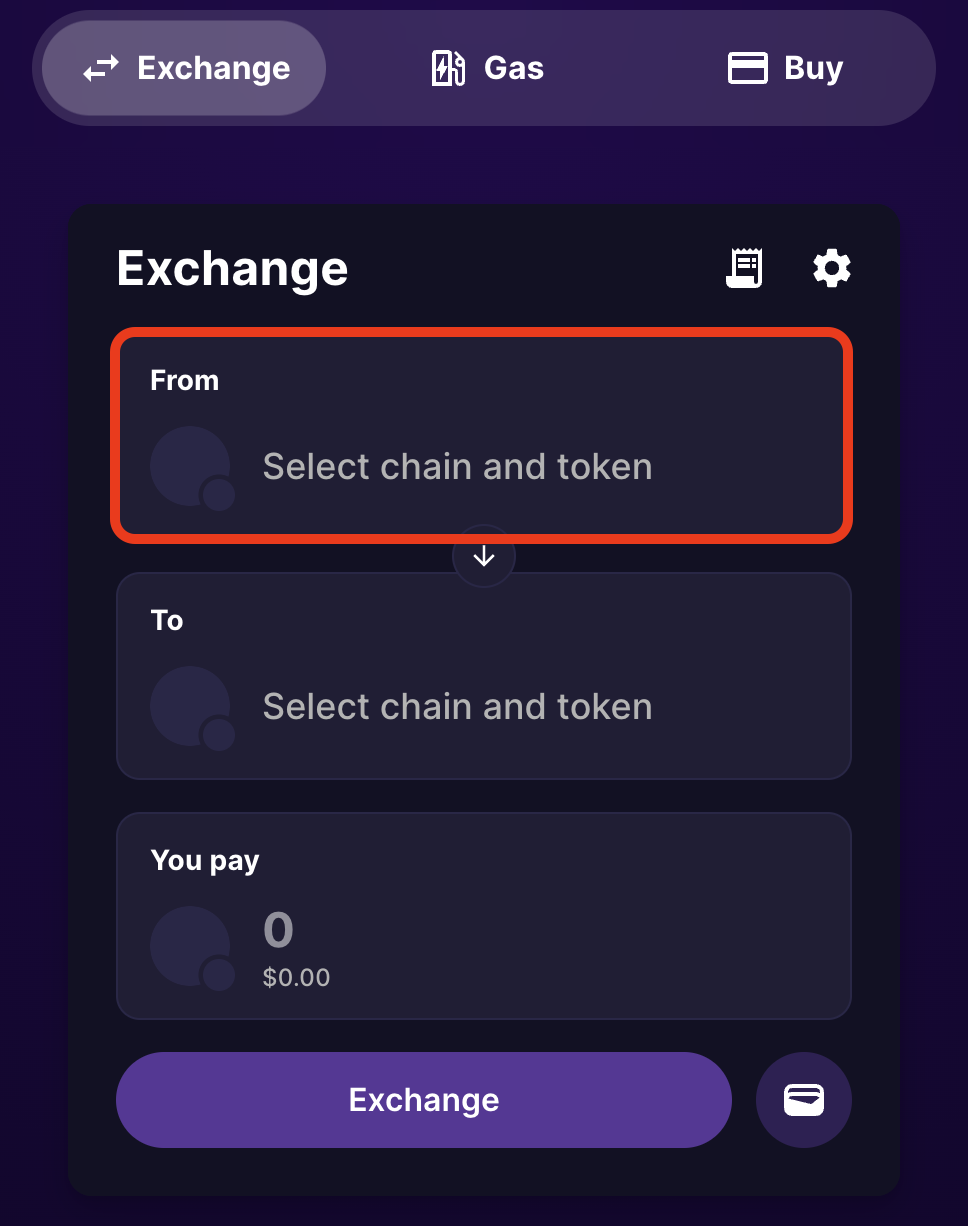
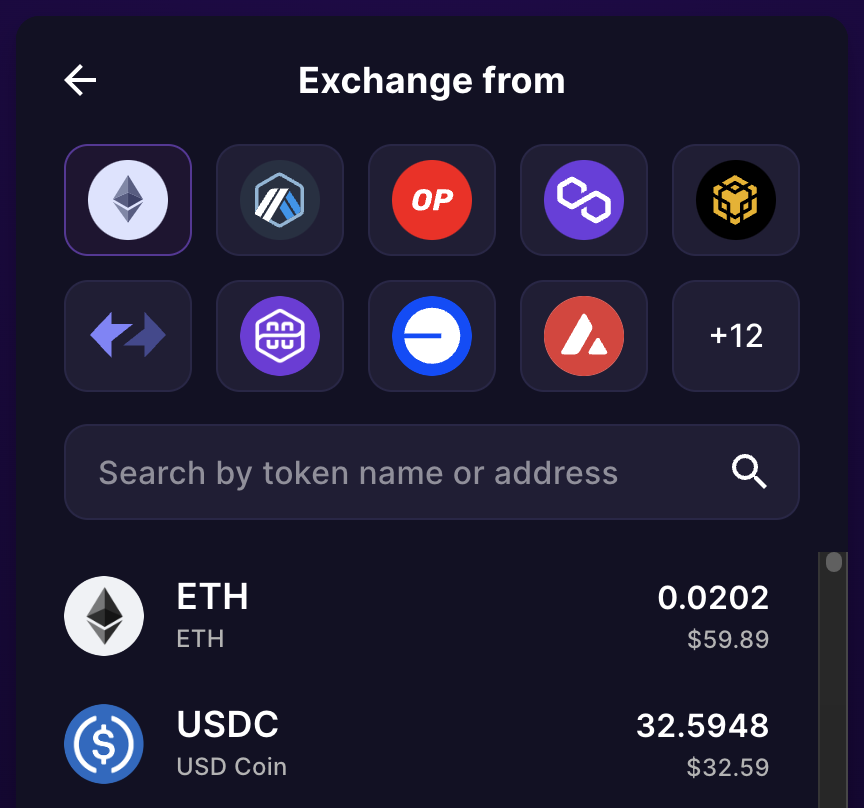
2. Click **\[From: Select chain and token]** to choose the source chain and token you want to bridge

<figure><img src="https://766933878-files.gitbook.io/~/files/v0/b/gitbook-x-prod.appspot.com/o/spaces%2FifJoX8SL0anL5Gj0WFNP%2Fuploads%2F2gnonX9OjoyWRG8AWznG%2FScreenshot%202024-05-09%20at%206.00.13%E2%80%AFPM.png?alt=media&#x26;token=ef9ad5e6-dd28-4113-a5cf-51dcfc2757c9" alt="" width="375"><figcaption></figcaption></figure>

<figure><img src="https://766933878-files.gitbook.io/~/files/v0/b/gitbook-x-prod.appspot.com/o/spaces%2FifJoX8SL0anL5Gj0WFNP%2Fuploads%2FI35CY6dD6pVU9KYz69T0%2FScreenshot%202024-05-09%20at%206.03.02%E2%80%AFPM.png?alt=media&#x26;token=039bb619-b0cd-4e17-881c-bac7dbff5815" alt="" width="375"><figcaption></figcaption></figure>

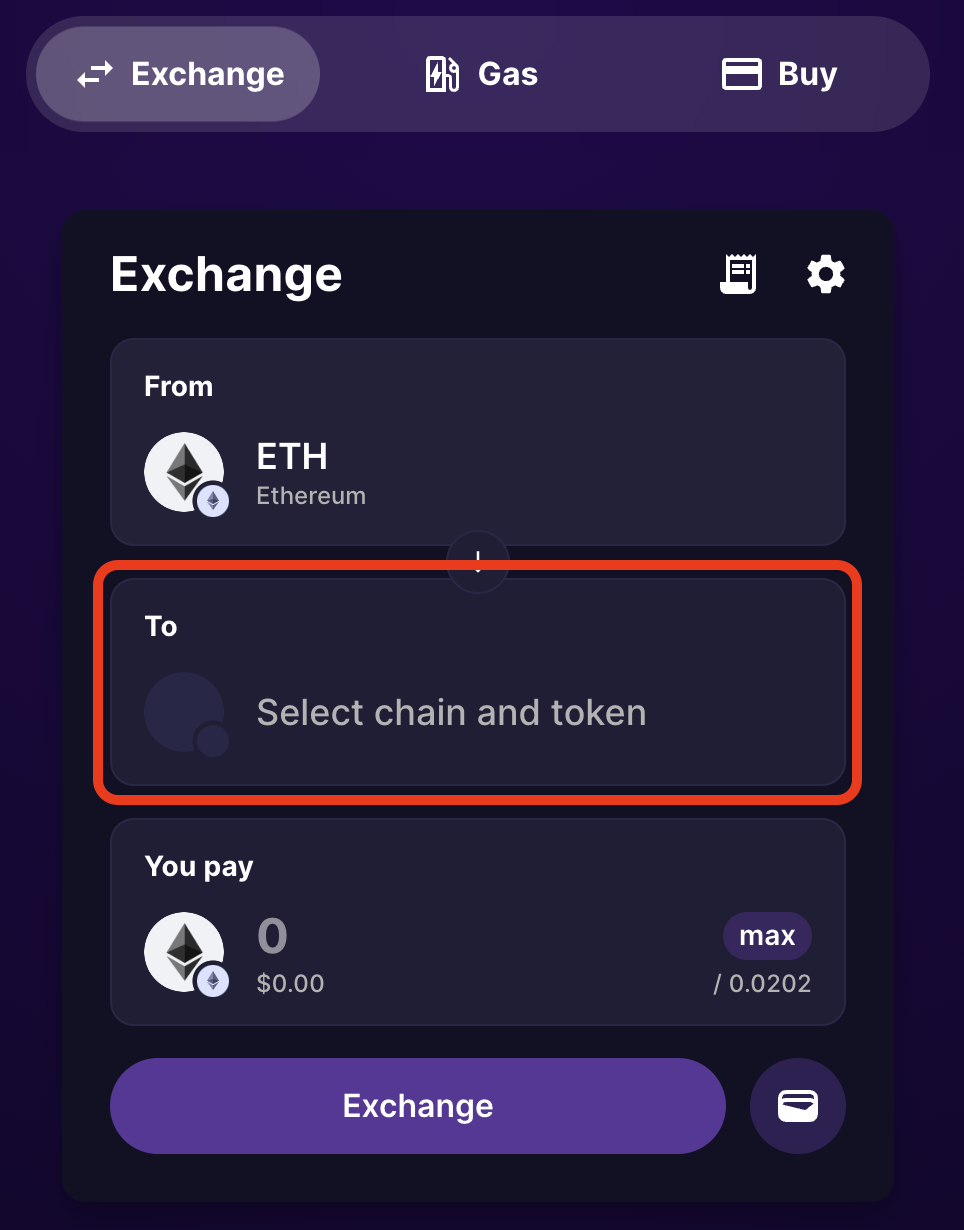
3. Choose Base Network as your destination network and token to bridge by clicking **\[To: Select chain and token].**

<figure><img src="https://766933878-files.gitbook.io/~/files/v0/b/gitbook-x-prod.appspot.com/o/spaces%2FifJoX8SL0anL5Gj0WFNP%2Fuploads%2F57Wihs4tzTvyL3ctjGNI%2FScreenshot%202024-05-09%20at%206.14.30%E2%80%AFPM.png?alt=media&#x26;token=7ec542b6-d06f-48ff-a178-65d4b5186fac" alt="" width="375"><figcaption></figcaption></figure>

<figure><img src="https://766933878-files.gitbook.io/~/files/v0/b/gitbook-x-prod.appspot.com/o/spaces%2FifJoX8SL0anL5Gj0WFNP%2Fuploads%2FX4mZgKZpNXLbk4Rp7R7c%2FScreenshot%202024-05-09%20at%206.16.52%E2%80%AFPM.png?alt=media&#x26;token=a551ff7b-83d6-4e2e-99ee-612826a2006e" alt="" width="375"><figcaption></figcaption></figure>

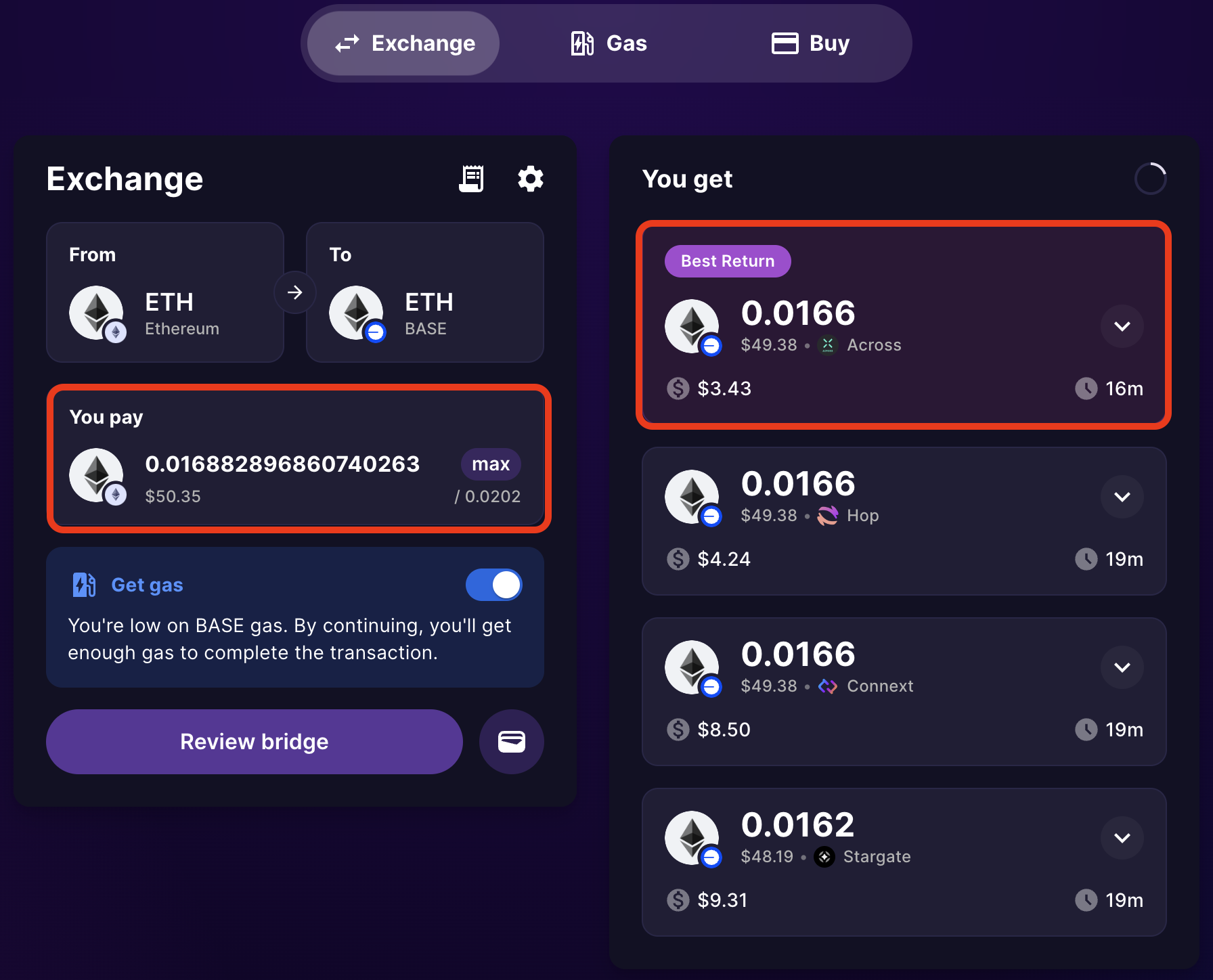
4. Enter the amount of token you want to bridge, Jumper will find the most efficient path and highlight the option with the best return to you.

<figure><img src="https://766933878-files.gitbook.io/~/files/v0/b/gitbook-x-prod.appspot.com/o/spaces%2FifJoX8SL0anL5Gj0WFNP%2Fuploads%2F7h5K0h8hfNIORv4IhW9n%2FScreenshot%202024-05-09%20at%206.19.25%E2%80%AFPM.png?alt=media&#x26;token=879f9772-8887-4a11-90de-3d082b8fd6ed" alt="" width="375"><figcaption></figcaption></figure>

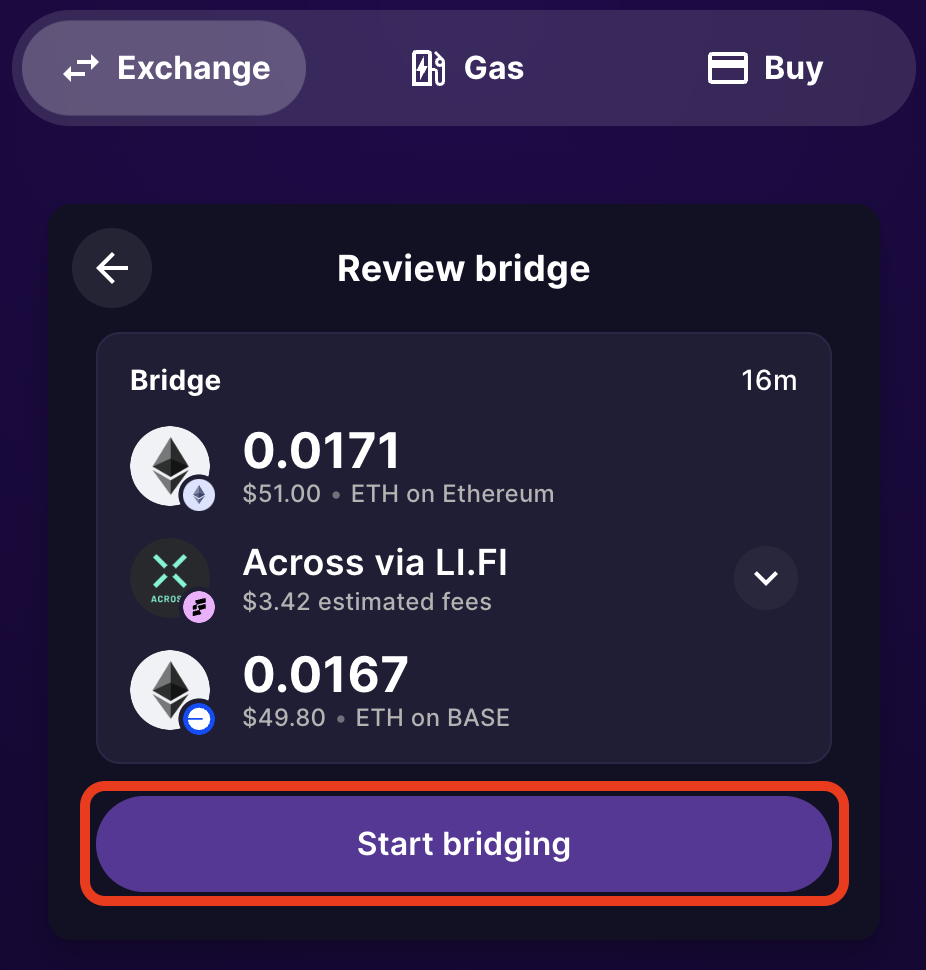
5. Select your preferred option and click **\[Start bridging]** to begin the transfer process.

<figure><img src="https://766933878-files.gitbook.io/~/files/v0/b/gitbook-x-prod.appspot.com/o/spaces%2FifJoX8SL0anL5Gj0WFNP%2Fuploads%2Fir3fHEEvNUmqVT7cpfBu%2FScreenshot%202024-05-09%20at%206.27.38%E2%80%AFPM.png?alt=media&#x26;token=6fed5244-3928-4dec-865b-cbd2651effb5" alt="" width="375"><figcaption></figcaption></figure>

6. Confirm the transaction in your wallet and your funds will soon be on Base Network!